
Business application
ScreenPro Studio
Record your screen and audio, then edit the video — built for business teams
ScreenPro Studio records your screen, camera, and audio, then lets you edit the footage right in the app — built for teams that need training videos and presentations ready to go.
Price coming soon
- Windows 10 and 11 (64-bit)
- License for 1 computer · key and installer link by email
- Requires a constant internet connection (license verification)
Key capabilities
- Capture your screen, camera, and audio together
- Choose from several compression methods
- Edit right in the built-in video editor
- Get output that's ready for training and presentations
Features
Screen, camera, and audio capture
Capture your screen, camera feed, and audio all at once.
Multiple compression options
Cut your file size down by picking the compression method that fits what you need.
Built-in video editor
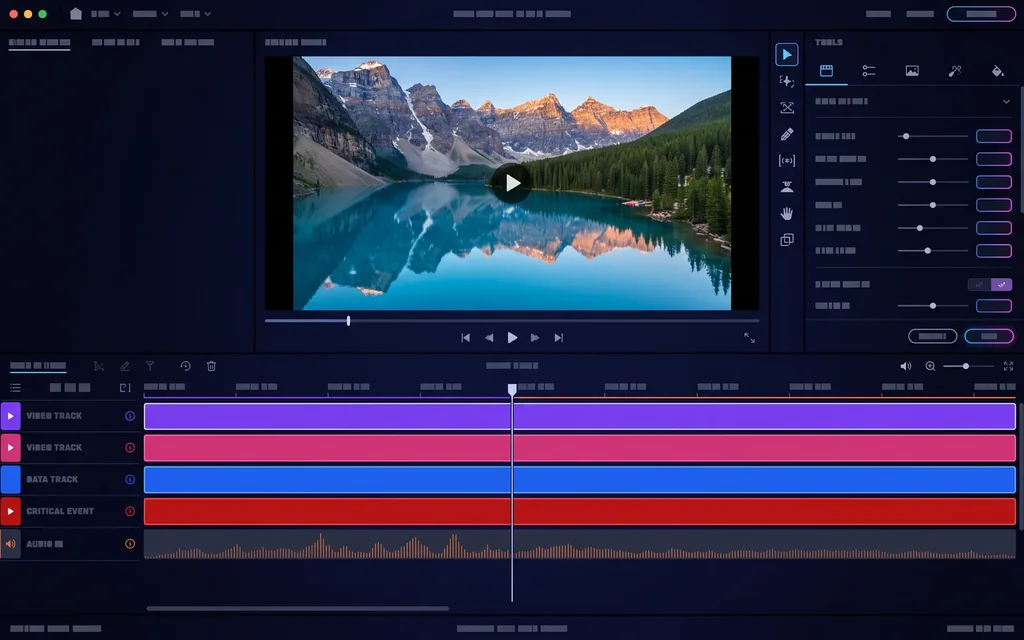
Edit your recordings right in the app, on a full timeline.
Presentation- and training-ready output
Turn your recordings into material you can use for training and presentations right away.
Pricing
Price coming soon Write to us and I'll let you know when plans become available.
Ask about accessThe price shown here is an estimate: we convert from PLN using the National Bank of Poland's exchange rate and round up. Your invoice and any payment you make are always processed in PLN - your card issuer or bank handles the actual conversion, and may apply its own rate or fees.
System requirements: Windows 10 and 11 (64-bit)
- Online payment
- VAT invoice
- Access once paid
- Support on business days


Use cases
- Recording internal training for your team
- Putting together product and company presentations
- Capturing how-to walkthroughs for tools and processes
- Editing screen recordings into marketing content
Questions about ScreenPro Studio
What are the purchase options?
The app is offered as a one-time license or as a subscription — monthly or annual. Current plan prices (or the note “Price coming soon”) are in the pricing section on this page.
How do I get a demo or pricing quote?
Reach out through our contact form, and we'll set you up with a demo and a quote tailored to your team.
Is support part of the subscription?
Yes — an active subscription includes updates and support the whole time it's running.
Does my subscription renew on its own?
No. It's prepaid, so before your period ends you'll get an email with a payment link for the next one. No payment means it simply expires at the end of the paid term — nothing is ever charged automatically. Cancel renewals anytime from your subscription page.
Do I need to be online to use ScreenPro Studio?
Yes — ScreenPro Studio is a Windows 10/11 desktop app that checks in with our license server every 30 seconds to verify your license, so it needs an active internet connection to run. A short connection blip won't interrupt your work — features only pause after about 2.5 minutes without a response from the server, and everything resumes automatically once you're back online.
About the application
ScreenPro Studio puts recording and video editing in one tool built for business use.
What you can do
- Capture your screen, camera, and audio together
- Compress files using several methods
- Edit recordings on the built-in timeline
- Turn out material that's ready for training and presentations
You get full video editing, a timeline, and a set of editing tools in one place.
Want to see the app in action? Let’s talk.
Free consultationScreenPro Studio
Ask about access