One-off license
One-off payment
$50 net
$60 gross (incl. 23% Polish VAT)
A single payment for the license, with no recurring charges.
- License with no billing periods
- One-off purchase, no commitment
Business application
Screenshot. Annotate. Done.
Select the screen, add arrows and text, save in any format, or copy to the clipboard. One lightweight Windows app instead of separate tools for screenshots, editing, and image conversion.
from $10 net/month
from $10 gross/month
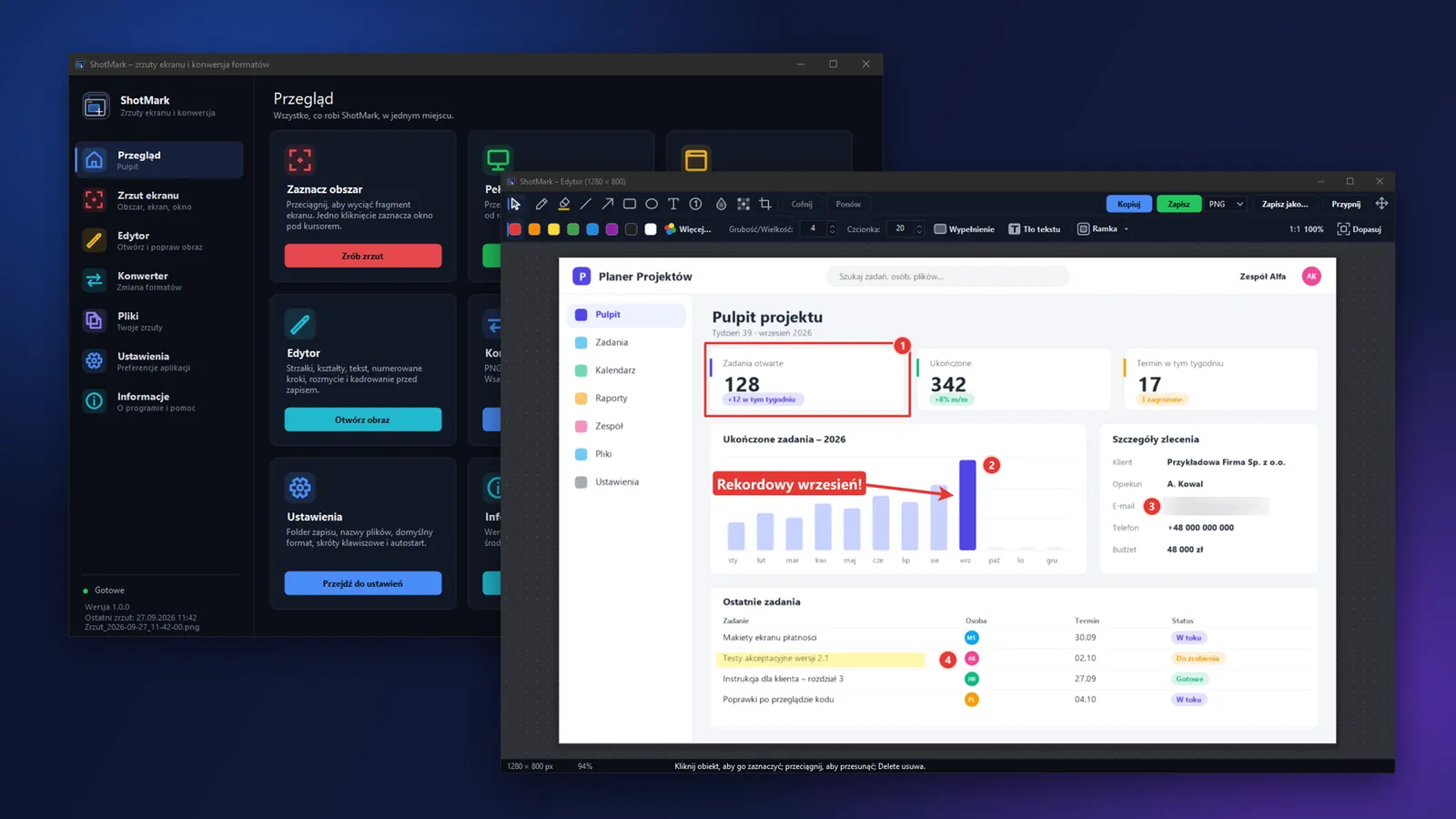
Capture
The overlay freezes the screen, shows live dimensions and a magnifier, and the window under your cursor highlights itself — one click is all it takes. Fine-tune the selection with the arrow keys, 1 px at a time, or 10 px with Shift.

Editor
The moment you take a screenshot, you land in the editor. Arrows, shapes, text with a background, and numbered steps make your point, while blur and pixelation hide passwords, email addresses, or faces.

Finishing touches
The Frame panel adds a border, margin, shadow, and rounded corners. Copy the result to the clipboard or save it — both options sit side by side, no dialog box in the way. You can also drag the finished image straight into an email or a chat app.

Converter and files
The converter changes many files at once, or combines them into one PDF, an animated GIF, or a multi-page TIFF. The file browser shows every saved screenshot as a thumbnail, with search, a format filter, and quick actions.

Look and shortcuts
Ten color schemes — eight dark and two light — apply across the whole app: the main window, editor, settings, converter, and the pinned window. Each of the six capture modes has its own keyboard shortcut, which you set yourself.

The overlay detects windows under the cursor and highlights them for a one-click capture.
Arrows, shapes, text, numbered steps, and blur — no switching to another program.
Convert many files at once, or combine them into one PDF, an animated GIF, or a multi-page TIFF.
Every saved screenshot with thumbnails, search, and quick actions, all in one place.
Six capture modes, each with its own, fully customizable keyboard shortcut.
Ten color schemes, dark and light, across the whole app.
Choose a plan: a one-off license or a subscription with updates.
One-off payment
$50 net
$60 gross (incl. 23% Polish VAT)
A single payment for the license, with no recurring charges.
Recommended
Billed monthly
$10 net/month
$10 gross/month (incl. 23% Polish VAT)
Prepaid monthly access. Before the period ends you receive a payment link – no automatic charges.
Billed annually
$30 net/year
$30 gross/year (incl. 23% Polish VAT)
Prepaid annual access. Before the period ends you receive a payment link – no automatic charges.
Renewal via a payment link before the period ends – no automatic charges; you can cancel at any time.
Gross prices include Polish VAT. For businesses and customers from other countries VAT is calculated in the order summary (e.g. reverse charge in the EU, 0% outside the EU).
The price shown here is an estimate: we convert from PLN using the National Bank of Poland's exchange rate and round up. Your invoice and any payment you make are always processed in PLN - your card issuer or bank handles the actual conversion, and may apply its own rate or fees.
A one-off license is granted for an indefinite period: the application works for as long as we run the service and the license server. You are buying a license to use the application, not ownership of it. Details: Terms of sale, § 9.
Real screenshots from the app. Click to enlarge.

Main window — Overview
A dashboard with tiles for every feature, in the dark Navy scheme.

Area selection
A dimmed, frozen screen with a selection rectangle, live dimensions, and a magnifier.
Window detection under the cursor
The overlay highlights the window for you, ready to capture with one click.
Editor with annotations
An arrow, a rectangle, text with a background, numbered steps, and a blurred email address — all on one screenshot.
The Frame panel in the editor
Border, margin, shadow, and rounded corners — all from one panel.

Capture modes and shortcuts
Five capture modes next to a keyboard shortcuts card showing the “Working” status.
Batch converter
A file list being converted, with modes for combining into PDF, GIF, or TIFF.

File browser
Saved screenshots shown as thumbnails, with search and a format filter.

Desktop pin
A screenshot pinned as a small window, always visible on top of other windows.
Color schemes
The same window in the Navy, Forest, Plum, and Light variants.

Settings — Appearance
The full list of ten color schemes to choose from.
No. ShotMark requires a constant internet connection — the license is confirmed continuously, and after about 2–3 minutes without contact with the license server, features lock (they come back on their own once the connection is restored). Only license data is sent over the internet — capturing, editing, saving, and converting all happen on your own computer.
No. The app has no feature for sending screenshots to the cloud or sharing them online — the only internet connection is for verifying the license (the key), never the content of your screenshots.
The app's interface and its messages are in Polish.
After purchase, you get a license key and a download link for the installer by email. The installer runs with no administrator rights, installs the app in your own user profile, and creates a shortcut in the Start menu; you enter the key the first time you run it. If Windows SmartScreen shows a warning, choose “More info,” then “Run anyway.”
In Windows, open “Apps & features,” select ShotMark, and click “Uninstall.” The uninstaller removes the program, and your saved screenshots stay on the disk.
On the “Screenshot” page and in Settings, the app shows whether a given shortcut works or is taken by another program (like Snipping Tool in Windows 11, or another screenshot app). Just assign any other free shortcut — each of the six capture modes has its own, fully customizable shortcut.
In the folder set in Settings (the “General” tab). The full list of saved files — with thumbnails and search — shows up on the “Files” page in the main window.
The license works on one computer. You can transfer it to a new one yourself, from your customer account on this website, in the licenses tab — once every 30 days.
Windows 10 (from version 1903) or Windows 11, 64-bit or 32-bit, plus .NET Framework 4.8, which comes built into both systems — nothing else to install. You'll also need a constant internet connection (for license verification).
PNG, JPG, WebP, GIF (including animated), BMP, TIFF (including multi-page), and PDF. WebP is always saved losslessly, and both lossless and lossy WebP files can be read, including with transparency. PDF is a save-only format.
Yes. The interface and screenshots use full DPI support (PerMonitorV2), so the image is sharp on every monitor, and the “Monitor under the cursor” mode lets you capture the content of a specific screen.
A monthly subscription, an annual subscription, or a one-time license. You'll find current prices in your currency in the pricing on this page. Subscriptions are prepaid — no automatic card charges.
ShotMark is a lightweight Windows app for taking and marking up screenshots. Select an area, a screen, or a window, land straight in the editor with arrows, text, and blur, then copy the result to your clipboard or save it in whatever format you need. It installs with a single installer, no administrator rights required, and your screenshots always stay on your own disk.
| Format | Read | Write | Notes |
|---|---|---|---|
| PNG | yes | yes | – |
| JPG | yes | yes | adjustable quality |
| WebP | yes | yes, lossless | reads both lossless and lossy files, including transparency |
| GIF | yes | yes, including animated | – |
| BMP | yes | yes | – |
| TIFF | yes, multi-page | yes, multi-page | – |
| no | yes | pages either lossless or as JPG |
ShotMarkfrom $10 net/month (from $10 gross/month)
Choose a planWe only use essential storage (e.g. to remember this choice). With your consent we also collect diagnostic data about how the site works (clicks, speed, errors) with a pseudonymous session ID – stored only on our server, with no ads and no third parties. Cookie policy


