
























One-off license
One-off payment
Price coming soon
A single payment for the license, with no recurring charges.
- License with no billing periods
- One-off purchase, no commitment
Coming soon Ask about access
Business application
Cold outreach. Warm replies.
LeadBloom is a Windows application that takes you from an empty list to a sales conversation: it finds companies, checks them in official registries, fills in contact details, helps you write personalized messages, sends them from your own mailbox, and organizes the replies in a CRM. Your data stays on your computer.
Windows 10 (version 1903 or later) and Windows 11
Sourcing
Enter keywords or choose PKD codes, a country, and a region. LeadBloom searches the CEIDG registry, industry directories, OpenStreetMap, and search engines, and later runs skip the companies you already have.

Verification
One button queries the VAT White List, KRS, CEIDG, GUS, and VIES. Results from several registries are merged, and every field shows its source and date — a green value is confirmed in a registry.

Campaigns
Describe your company and offer, choose a style and tone, and AI writes a separate email for each recipient. Validation holds back emails with empty variables, emails missing the GDPR notice or unsubscribe link, and emails with figures or claims that aren't in your data.

Sending
You review every email in the approval queue next to the company data. Approved messages leave your mailbox in batches — on the days and at the hours you choose, with a daily limit and a random interval between emails.

Inbox and CRM
Replies fetched over IMAP land in the inbox with a recognized category: interested, not now, no, someone else, unsubscribe, or bounce. One click turns a conversation into a sales opportunity that you move through the pipeline until it is won.

Deliverability and compliance
LeadBloom checks SPF, DKIM, and DMARC, sends a test email, and — if you want — warms up the mailbox. After a hard bounce, the address goes onto the suppression list automatically, and the campaign pauses when there are too many bounces.

The CEIDG registry, industry directories, OpenStreetMap, search engines through your own Chrome, and an AI model — all in one database, with no duplicates.
VAT White List, KRS with financial statements, CEIDG, GUS, and VIES behind one button; a green value is confirmed in a registry.
For every value, you see whether it came from an official registry, the company website, AI, or manual entry — and when it was retrieved.
A separate email for each recipient, based on the company data and your offer; validation stops invented facts and empty variables.
You approve emails with the A and R keys, and the program sends them from your mailbox within a time window, 90–180 s apart at random.
Replies with a recognized category — interested, not now, bounce — and sales opportunities with tasks and reminders.
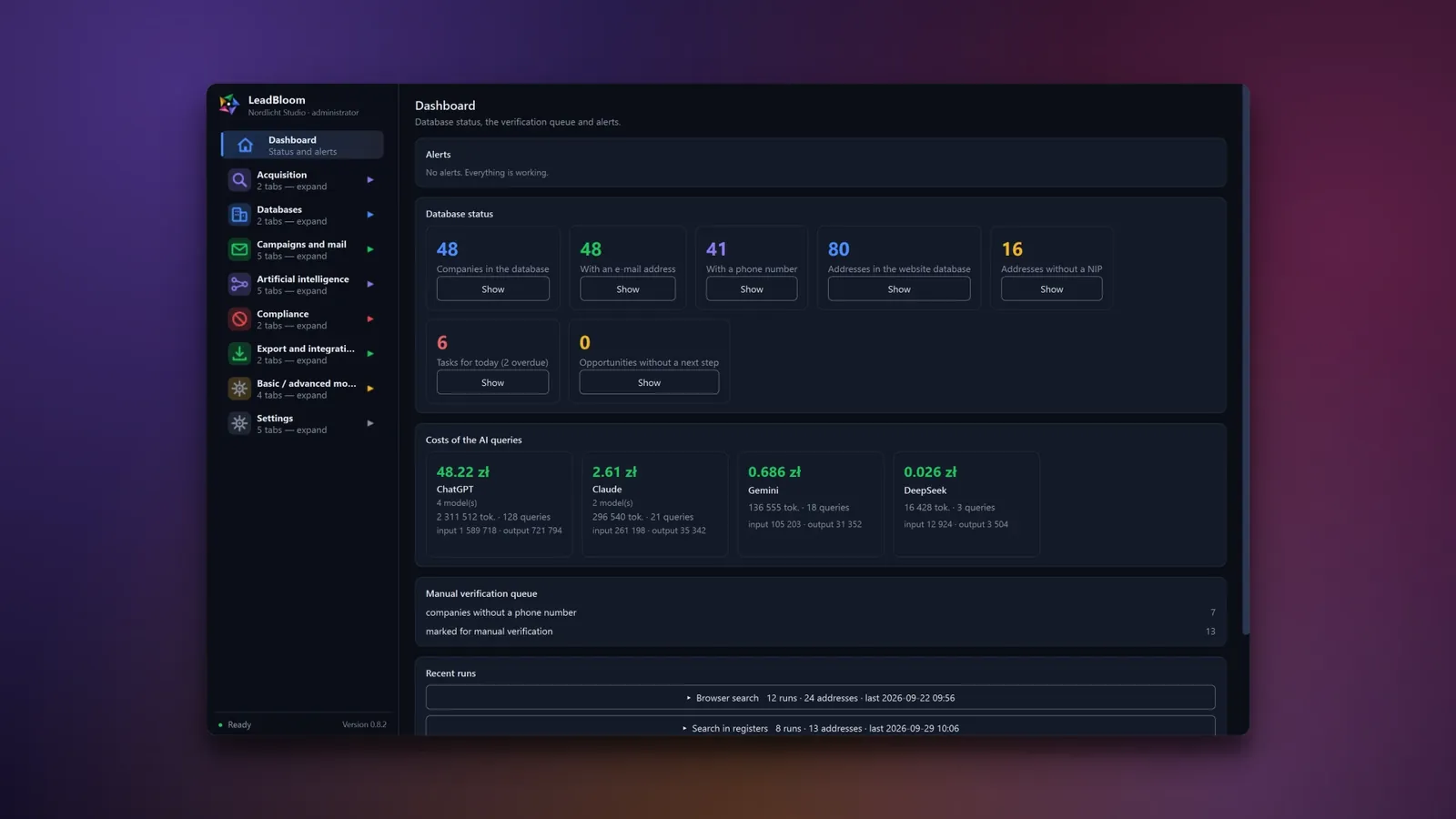
Real screenshots from the app. Click to enlarge.

Dashboard
Your whole B2B sales pipeline on one screen
New search
Describe your customer – LeadBloom finds companies in registers and on the web

New search (progress)
See what the program finds, live

Browser search
Search in your own browser – no API keys, at a safe pace

AI prospecting
AI suggests companies, LeadBloom checks that their websites exist

AI prospecting history
Every AI series with its cost and result

Company database
Green = confirmed in a register. Red = something does not match.
Company card
Every piece of data shows where it came from

Website database (AI menu)
Fill in missing data with one click
Campaigns
AI writes, you approve

Campaign content and steps
A sequence: letter, follow-up, goodbye
Company and offer data
Describe your offer once – AI writes the letters for each recipient

Mailbox
Replies recognized and sorted
CRM
From reply to deal – in one pipeline

Mail statistics
Know what works – results for every campaign and every stage
Deliverability
Check that your e-mails land in the inbox, not in spam

Exclusion list
Once someone opts out, they get no further messages

AI task
Five AI providers in one place

AI cost chart
AI costs under control – every query in the history

Settings
Your look, your language
LeadBloom is a desktop application for Windows 10 and 11 built for B2B prospecting. It brings company search, verification in official registries, contact enrichment, AI-assisted cold email campaigns, reply handling, and a simple CRM together in one program. It runs locally — no cloud and no paid contact database — and email goes out from your own mailbox.
| Task | Usually | In LeadBloom |
|---|---|---|
| List of companies by industry and region | a paid contact database | CEIDG registry, directories, OpenStreetMap, search engines, and AI |
| Checking a business partner | manual lookups in several registries | one button: VAT White List, KRS, CEIDG, GUS, VIES |
| Email addresses and phone numbers | a separate contact-finder tool | a crawler for company websites |
| Cold email campaign | a mailing tool | campaigns of up to 5 steps sent from your own mailbox |
| Sender reputation | a separate mailbox warm-up service | SPF/DKIM/DMARC check, warm-up, and campaign safety limits |
| Replies and sales | a separate CRM | inbox and sales pipeline in the same window |
For salespeople, small business owners, lead generation agencies, and B2B sales teams (up to 5 user accounts with roles) who want to build their own prospect lists and run outreach without subscriptions to contact databases and mailing tools.
Search covers 29 countries (the European Union, the United Kingdom, and the USA). The official registries built into the program are Polish; VAT numbers from other EU countries are checked in VIES.
Choose a plan: a one-off license or a subscription with updates.
One-off payment
Price coming soon
A single payment for the license, with no recurring charges.
Coming soon Ask about access
Recommended
Billed monthly
Price coming soon
Prepaid monthly access. Before the period ends you receive a payment link – no automatic charges.
Renewal via a payment link before the period ends – no automatic charges; you can cancel at any time.
Coming soon Ask about access
Billed annually
Price coming soon
Prepaid annual access. Before the period ends you receive a payment link – no automatic charges.
Renewal via a payment link before the period ends – no automatic charges; you can cancel at any time.
Coming soon Ask about access
Gross prices include Polish VAT. For businesses and customers from other countries VAT is calculated in the order summary (e.g. reverse charge in the EU, 0% outside the EU).
The price shown here is an estimate: we convert from PLN using the National Bank of Poland's exchange rate and round up. Your invoice and any payment you make are always processed in PLN - your card issuer or bank handles the actual conversion, and may apply its own rate or fees.
A one-off license is granted for an indefinite period: the application works for as long as we run the service and the license server. You are buying a license to use the application, not ownership of it. Details: Terms of sale, § 9.
 Online payment
 VAT invoice
 Access once paid
 Support on business days
LeadBloom is a Windows 10 and 11 application for B2B prospecting. In one window, it finds companies, checks them in official registries, fills in contact details, prepares AI-assisted cold email campaigns, sends them from your own mailbox, and organizes the replies in a CRM.
From public sources: the CEIDG registry, industry directories (in 7 countries), OpenStreetMap, search engines (including through your own Chrome), the companies' own websites, and — if you want — an AI model. You confirm the data in the Polish VAT White List, KRS, CEIDG, GUS, and the EU VIES system. Every field shows where it came from and when it was retrieved.
No. LeadBloom does not use a paid contact database — you build the list yourself from public sources — and email is sent from your own mailbox (for example Gmail, Outlook/Microsoft 365, OVH, Zoho, or your own server). By default, only free search sources are used; you connect paid search and AI providers with your own key only if you want to.
No. No message leaves without human approval. You review every email in the approval queue (A to approve, R to reject), and approved emails are sent in batches according to the schedule you set.
The program limits this on several levels: a ban on inventing facts, prices, and past cooperation (it can't be switched off), links taken only from the “Links” field, and validation that detects figures and claims not found in your data and holds such an email in the queue with the reason. The model also never sees the recipient's email address.
Yes. In browser mode, the Chrome extension types the questions into a chat window where you are logged in (ChatGPT, Claude, Gemini, Perplexity, DeepSeek, or Microsoft Copilot), so you don't pay for tokens. You can also connect your own OpenAI, Anthropic, Google, Perplexity, or DeepSeek API keys — the cost of every query is shown in the history.
On your computer — in a local database and files in the LeadBloom folder in your user profile. The program has no cloud to which it would upload your company database. Internet connections are used for searching, querying registries, sending and receiving email, the AI providers you choose, and license verification.
Compliance mechanisms are built into how the program works: an overriding suppression list (checked when building a list and right before sending), a GDPR Article 14 notice and an unsubscribe link in every email, a required legal basis for named addresses, a legal risk rating of the recipient's country, and no open or click tracking. The sender remains responsible for the content and legality of a campaign — the program does not replace legal advice.
Search covers 29 countries: the European Union, the United Kingdom, and the USA, and each country shows a legal risk rating. The official registries built into the program are Polish (VAT White List, KRS, CEIDG, GUS); VAT numbers from other EU countries are checked in VIES. The interface is available in Polish, English, German, French, Spanish, and Italian, and the AI writes emails in 9 languages.
Yes. Chrome is required for browser search, AI browser mode, and saving script-rendered pages. You install the extension from within the application — the program copies the files and guides you step by step.
LeadBloom has several safeguards: an SPF, DKIM, and DMARC check, a test send, optional mailbox warm-up, a random interval of 90–180 s between emails, daily limits, and an automatic campaign pause when there are too many bounces (by default from 5% hard bounces). An address that hard-bounced goes onto the suppression list.
Yes. Import supports CSV, TSV, TXT, XLSX, XLSM, and JSON files (columns detected by the header in 6 languages or by the content), and export supports CSV, XLSX, and JSON. You can also pass data to other systems through API v1 and HMAC-signed webhooks.
Up to 5 user accounts with roles: administrator, operator, and viewer. Accounts are protected against password guessing and offer optional two-factor sign-in (TOTP) and an activity log.
Windows 10 (version 1903 or later) or Windows 11, Google Chrome, and an internet connection. The installer works for a single user, without administrator rights. Optionally, you can add free official GUS BIR1 and CEIDG keys and keys from search and AI providers — the program also works without them, with a smaller set of sources.
A one-time license or a prepaid subscription — monthly or annual, with no automatic card charges. You'll find the prices of each plan in the price list on this page.
We only use essential storage (e.g. to remember this choice). With your consent we also collect diagnostic data about how the site works (clicks, speed, errors) with a pseudonymous session ID – stored only on our server, with no ads and no third parties. Cookie policy
