
























Skip to content

Business application

LeadBloom

Cold outreach. Warm replies.

LeadBloom is a Windows application that takes you from an empty list to a sales conversation: it finds companies, checks them in official registries, fills in contact details, helps you write personalised messages, sends them from your own mailbox and organises the replies in a CRM. Your data stays on your computer.

Windows 10 (version 1903 or later) and Windows 11
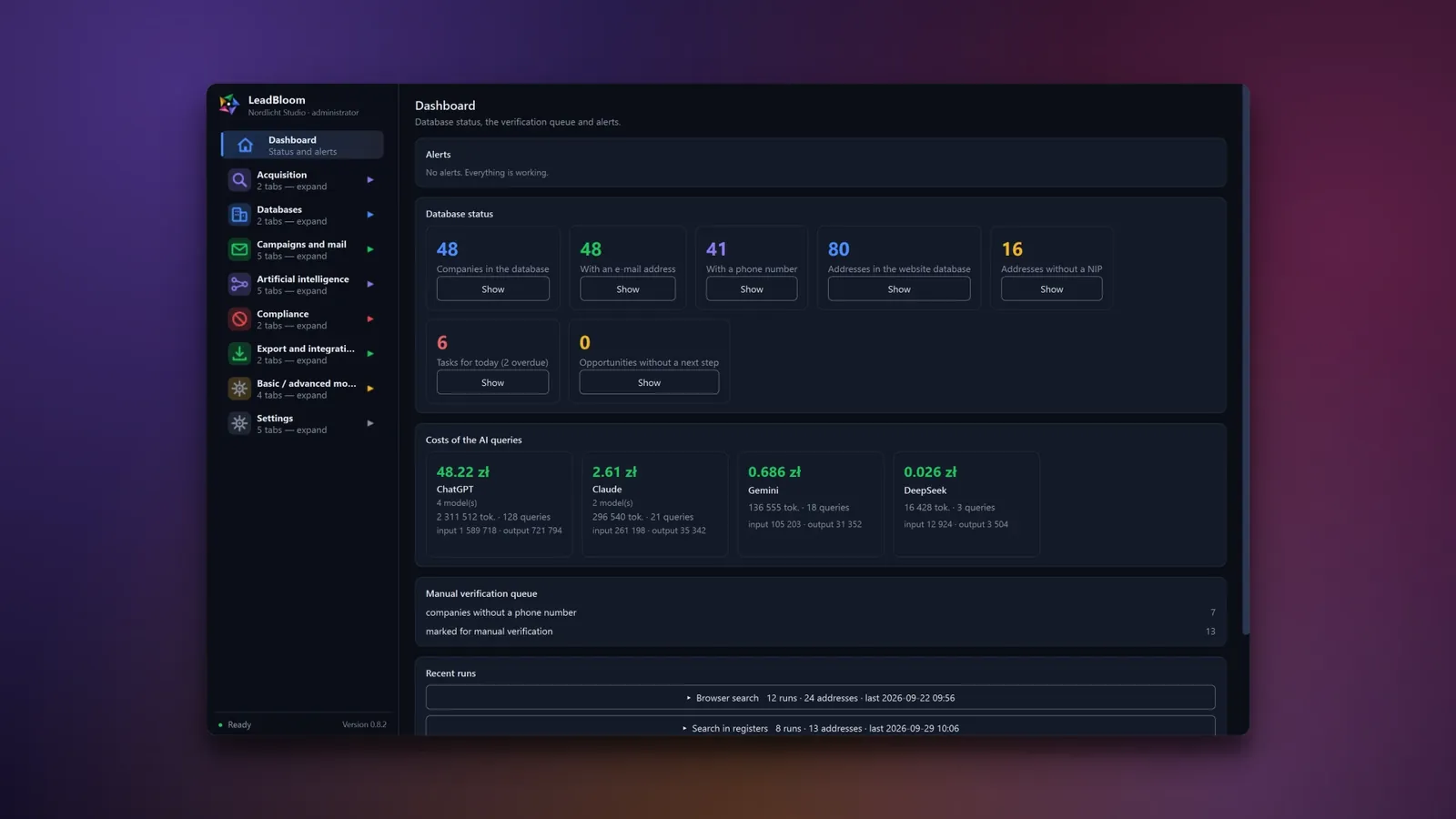
LeadBloom dashboard with company count tiles, AI costs by provider and a list of recent search runs

Key capabilities

Sourcing

A list of companies from your industry and region

Enter keywords or choose PKD codes, a country and a region. LeadBloom searches the CEIDG registry, industry directories, OpenStreetMap and search engines, and later runs skip the companies you already have.

  • 29 search countries, each with a legal risk rating and the available registries
  • Search through your own Chrome in 10 search engines – with no CAPTCHA bypassing
  • AI sourcing with a DNS check of every address and costs visible as you go
Company search form with the phrase accounting office, PKD code 69.20.Z and the Wielkopolskie region

Verification

Data confirmed in official registries

One button queries the VAT White List, KRS, CEIDG, GUS and VIES. Results from several registries are merged, and every field shows its source and date – a green value is confirmed in a registry.

  • Revenue and net profit from financial statements filed in KRS
  • Differences between the company website and the registry as a separate result
  • AI estimates marked “≈” – they never overwrite registry data
Company card window with registry data fields and the source of each field

Campaigns

AI-written messages that don't make things up

Describe your company and offer, choose a style and tone, and AI writes a separate email for each recipient. Validation holds back emails with empty variables, without the GDPR notice or unsubscribe link, and with figures or claims that are not in your data.

  • Up to 5 steps: the main email and follow-ups in the same thread
  • The model never sees the recipient's email address
  • Offer details can be filled in by AI from your website or a file
Company and offer data window with the fields filled in for the fictional company Nordlicht Studio

Sending

Nothing goes out without your approval

You review every email in the approval queue next to the company data. Approved messages leave your mailbox in batches – on the days and at the hours you choose, with a daily limit and a random gap between emails.

  • Suppression list, limits and time window checked again before every email
  • A reply from the recipient stops their sequence
  • An out-of-office reply moves the next step to the day after the recipient returns
Campaigns tab with the campaign table, the approval queue and a preview of a personalised letter

Inbox and CRM

From reply to won opportunity

Replies fetched over IMAP land in the inbox with a recognised category: interested, not now, no, someone else, unsubscribe or bounce. One click turns a conversation into a sales opportunity that you move through the pipeline until it is won.

  • Tasks with due dates, reminders and a list of opportunities idle for 14 days
  • AI analysis of up to 20 opportunities at once
  • Mail fetched in read-only mode – messages are not marked as read
CRM tab with the sales pipeline, a table of opportunities with values in PLN and the selected opportunity panel

Deliverability and compliance

Protects your sender reputation and keeps to the rules

LeadBloom checks SPF, DKIM and DMARC, sends a test email and – if you want – warms up the mailbox. After a hard bounce the address goes onto the suppression list automatically, and the campaign pauses when there are too many bounces.

  • Legal risk rating for 35 countries with the legal basis and the supervisory authority
  • A GDPR Article 14 notice and an unsubscribe link in every email
  • Deliberately no open or click tracking
Deliverability tab with valid SPF, DKIM and DMARC records and the result of a test send

Features

  • Sourcing from many channels

    The CEIDG registry, industry directories, OpenStreetMap, search engines through your own Chrome and an AI model – all in one database, without duplicates.

  • Registry verification

    VAT White List, KRS with financial statements, CEIDG, GUS and VIES behind one button; a green value is confirmed in a registry.

  • The origin of every field

    For every value you see whether it came from an official registry, the company website, AI or manual entry – and when it was retrieved.

  • AI-written campaigns

    A separate email for each recipient, based on the company data and your offer; validation stops invented facts and empty variables.

  • Approval and batch sending

    You approve emails with the A and R keys, and the program sends them from your mailbox within a time window, 90–180 s apart at random.

  • Inbox and CRM

    Replies with a recognised category – interested, not now, bounce – and sales opportunities with tasks and reminders.

Screenshots

Real screenshots from the app. Click to enlarge.

  • LeadBloom dashboard with company count tiles, AI costs by provider and a list of recent search runs

    Dashboard

    Your whole B2B sales pipeline on one screen

  • Company search form with the phrase accounting office, PKD code 69.20.Z and the Wielkopolskie region

    New search

    Describe your customer – LeadBloom finds companies in registers and on the web

  • Search progress panel with a progress bar, a list of found companies and the run log

    New search (progress)

    See what the program finds, live

  • Browser search window with a list of phrases, search engine choice and pace

    Browser search

    Search in your own browser – no API keys, at a safe pace

  • AI prospecting tab with the phrase accounting office and a list of website addresses found

    AI prospecting

    AI suggests companies, LeadBloom checks that their websites exist

  • AI prospecting history window with a list of series, costs and the number of addresses found

    AI prospecting history

    Every AI series with its cost and result

  • Company database table with company names, tax IDs (NIP), e-mails, phone numbers and PKD codes; data confirmed in a register highlighted in green

    Company database

    Green = confirmed in a register. Red = something does not match.

  • Company card window with registry data fields and the source of each field

    Company card

    Every piece of data shows where it came from

  • Website database table with the AI menu expanded, showing the data enrichment commands

    Website database (AI menu)

    Fill in missing data with one click

  • Campaigns tab with the campaign table, the approval queue and a preview of a personalised letter

    Campaigns

    AI writes, you approve

  • Campaign content window with stage tabs, message subject and body

    Campaign content and steps

    A sequence: letter, follow-up, goodbye

  • Company and offer data window with the fields filled in for the fictional company Nordlicht Studio

    Company and offer data

    Describe your offer once – AI writes the letters for each recipient

  • Inbox with a list of threads, an “interested” label and a conversation preview

    Mailbox

    Replies recognised and sorted

  • CRM tab with the sales pipeline, a table of opportunities with values in PLN and the selected opportunity panel

    CRM

    From reply to deal – in one pipeline

  • Mail statistics with metric tiles and a day-by-day chart of sent messages, replies and bounces

    Mail statistics

    Know what works – results for every campaign and every stage

  • Deliverability tab with valid SPF, DKIM and DMARC records and the result of a test send

    Deliverability

    Check that your e-mails land in the inbox, not in spam

  • Suppression list with level, masked value, source and date added

    Exclusion list

    Once someone opts out, they get no further messages

  • Task tab with a prompt for the AI model, model choice and the answer

    AI task

    Five AI providers in one place

  • Bar chart of daily AI query costs over the last 30 days and a cost table by model

    AI cost chart

    AI costs under control – every query in the history

  • Application settings with interface scale, colour scheme, language and currency choice

    Settings

    Your look, your language

Full list of features

Dashboard

  • Alerts with fixes – expired keys, search engine blocks and sending errors – every alert has a button that leads to the solution.
  • Database status – number of companies, companies with email and phone, addresses in the Website database and records without a tax ID; a click opens the right tab.
  • CRM and AI costs – today's and overdue tasks, opportunities without a next step, and AI costs by provider and model.

Company sourcing

  • New search – keywords, multiple PKD codes (PKD 2007 tree, 1,652 entries), country, region, city and a limit of up to 10,000 results.
  • Candidate sources – the CEIDG registry, industry directories in 7 countries, DuckDuckGo, OpenStreetMap, your own SearXNG instance and 10 search providers with your key; a free-only mode is on by default.
  • Run modes – search only, breadth crawl, depth crawl or full – with depth 0–5 and 1 to 32 parallel downloads.
  • Search through Chrome – the extension uses your own Chrome in 10 search engines at three work paces; when asked “are you human”, the run waits for you.
  • Import from the browser – paste a whole Google or Bing results page, and the program discards ads, search engine links and social profiles.
  • AI sourcing – a series of narrow keyword × city queries, five geographic scopes, a DNS check of every address and costs visible as you go.
  • Check sources – a test of which source works, fails or is blocked, plus firewall and antivirus advice.

Databases

  • Website database and Company database – everything found goes into the Website database; records move to the Company database only when you decide.
  • 30 colour-coded columns – a green value – confirmed in a registry, a red row – another company's tax ID, a yellow row – three unsuccessful enrichment attempts.
  • Filters across the whole database – search with “or”, country, source, missing tax ID, date range, missing columns and narrowing to a single run.
  • Import and paste – CSV, TSV, TXT, XLSX, XLSM and JSON files with column detection in 6 languages, or a pasted list of tax IDs and addresses with a preview.

Enrichment and verification

  • Fill in data – the crawler collects NIP, REGON and KRS numbers, emails and phone numbers with the person and job title, social profiles and keywords; it reads structured data and hidden email addresses.
  • Confirm in registries – VAT White List (batches of 30 tax IDs), KRS with share capital and financial statements, CEIDG, GUS BIR1 and VIES – results merged with a priority for each field.
  • AI enrichment – the model fills in selected columns and finds website addresses; values are validated and never overwrite registry data.
  • Estimated annual revenue – the figure from a KRS financial statement or an AI estimate marked “≈”, converted into your chosen currency at ECB rates.

Company card and mailing lists

  • 22 fields with an origin marker – registry, financial statement, company website, AI estimate, manual entry or import; a manual edit locks the field against automatic overwrites.
  • Contacts and history – people with their role and department, addresses, a comparison with the registry, change history and sales opportunities.
  • Mailing lists – generic addresses only, named addresses only or a full list; addresses on the suppression list are always skipped.

Campaigns

  • Three content modes – the same content for everyone, a separate subject and body for each step, or an email written by AI for each recipient.
  • Up to 5 steps – the main email and follow-ups 1 to 60 days apart, sent in the same thread.
  • AI instructions – 5 styles, 4 tones, form of address, 9 email languages and 6 length ranges – which you can save as a template.
  • Company and offer details – 9 fields: company, offer, target audience, strengths, proof, pricing, your ask, links and what not to write; AI can fill them in from your website or a file.
  • Content safety – no invented facts or prices, links only from your list, and emails with empty variables or without the GDPR notice and unsubscribe link are blocked.
  • Sending schedule – days of the week and hours, a daily limit per mailbox and per batch, skipping public holidays and an automatic start in the sending window.
  • Duplicate protection – when an address is already in another campaign, the program asks whether to add only new addresses, all of them, or move them.

Inbox and CRM

  • Inbox with categories – bounces, out-of-office replies with a return date and replies: interested, not now, no, someone else, unsubscribe – you can correct the category by hand.
  • 18 ready-made mailbox profiles – including Gmail/Workspace, Outlook/Microsoft 365, OVH, Zoho, Yahoo, iCloud, GMX, Fastmail and your own server, plus popular Polish providers; app passwords stored encrypted.
  • Sales pipeline – Reply → Conversation → Offer → Won or Lost; only a person changes the stage.
  • Tasks and AI analysis – today's tasks, reminders with sound, idle opportunities and analysis of up to 20 opportunities at once, with recommendations saved in the history.

Statistics and deliverability

  • Email statistics – sent, delivered, bounces, replies from people, unsubscribes and complaints – counted per unique address, with a daily chart.
  • DNS and delivery test – SPF, DKIM and DMARC check and a test send that reads whether the email landed in the Inbox or in spam.
  • Mailbox warm-up – optionally 5, 10, 15 and 20 emails a day in the following weeks, then gradually up to the target limit.
  • Safety limits and bounce automation – a campaign pauses when there are too many bounces or complaints, and an address is suppressed automatically after a hard bounce.

Artificial intelligence

  • API providers – OpenAI (ChatGPT), Anthropic (Claude), Google (Gemini), Perplexity and DeepSeek – each with its own keys, price list and balance.
  • Browser mode without a key – questions go to your logged-in chat in ChatGPT, Claude, Gemini, Perplexity, DeepSeek or Microsoft Copilot, with no token bill.
  • Task and Improve prompt – series of prompts with attachments, a cost estimate before sending, image and SVG generation and prompt refinement.
  • History and costs – every query with tokens, cost, time and error, and a cost chart by model.

Legal compliance

  • Suppression list – an email address, domain or tax ID, stored as a salted SHA-256 hash; entries come from unsubscribe links, replies, the API and bounces.
  • Country risk – a classification of 35 countries with the legal basis, consent model, penalties and supervisory authority; a high-risk country must be unlocked with a code.
  • Pre-send gate – suppression list, legal basis for named addresses, country risk and the information obligation checked before sending.
  • A polite crawler – an open User-Agent, 1 request per second per server, robots.txt according to each country's policy, no logins, CAPTCHAs or paywalls.

Export and integrations

  • Export – CSV, XLSX and JSON with a choice of rows and columns and protection against formula injection into spreadsheets.
  • API v1 – keys with scopes (companies, campaign sending, suppression list), rate limiting and idempotency.
  • Webhooks – 7 events signed with HMAC, up to 5 delivery attempts and automatic disabling after a series of errors.

Settings and security

  • Six interface languages – Polish, English, German, French, Spanish and Italian – the change takes effect immediately, without a restart.
  • Appearance – 22 colour schemes, including high contrast, scaling from 25% to 200% and a basic and an advanced mode.
  • Accounts and roles – up to 5 users (administrator, operator, viewer), protection against password guessing, optional 2FA (TOTP) and an activity log.
  • Keys and secrets – API keys are encrypted and only the last 4 characters are shown; the internal server listens only on 127.0.0.1.

About the application

LeadBloom is a desktop application for Windows 10 and 11 for B2B prospecting. It brings company search, verification in official registries, contact enrichment, AI-assisted cold email campaigns, reply handling and a simple CRM together in one program. It runs locally – no cloud and no paid contact database – and email is sent from your own mailbox.

How it works

  1. Find companies – by keywords, industry codes (Polish PKD) and region: in the CEIDG business registry, industry directories, OpenStreetMap, search engines and with the help of an AI model. You can also paste a list of tax IDs (NIP) or website addresses, or import a file.
  2. Check them in registries – the Polish VAT White List, KRS (including revenue and net profit from financial statements), CEIDG, GUS and the EU VIES system. Every field keeps its source and date.
  3. Fill in contacts – a crawler visits the company website and its subpages and collects email addresses and phone numbers together with the person, job title and department.
  4. Prepare a campaign – up to 5 steps (an email and follow-ups), with content from a template or written by AI separately for each recipient.
  5. Approve and send – you approve every message in a queue, and sending happens in batches from your mailbox, on the days and at the hours you choose.
  6. Run the conversations – replies land in the inbox with a recognised category, and one click turns a conversation into a sales opportunity in the CRM.

Three principles the program is built on

  • The official registry comes first. An estimate, e.g. from AI, never pretends to be a fact – it is marked with “≈” and never overwrites registry data.
  • No message leaves without human approval.
  • The suppression list overrides everything, including the administrator – the program checks it when building a mailing list and again right before sending.

One program instead of several services

Task Usually In LeadBloom
List of companies by industry and region a paid contact database CEIDG registry, directories, OpenStreetMap, search engines and AI
Checking a business partner manual lookups in several registries one button: VAT White List, KRS, CEIDG, GUS, VIES
Email addresses and phone numbers a separate contact-finder tool a crawler for company websites
Cold email campaign a mailing tool campaigns of up to 5 steps sent from your own mailbox
Sender reputation a separate mailbox warm-up service SPF/DKIM/DMARC check, warm-up and campaign safety limits
Replies and sales a separate CRM inbox and sales pipeline in the same window

Who it is for

For salespeople, small business owners, lead generation agencies and B2B sales teams (up to 5 user accounts with roles) who want to build their own prospect lists and run outreach without subscriptions to contact databases and mailing tools.

Search covers 29 countries (the European Union, the United Kingdom and the USA). The official registries built into the program are Polish; VAT numbers from other EU countries are checked in VIES.

Use cases

  • Building a list of companies in a chosen industry and region – by keywords, PKD codes, province and city
  • Filling in contact details for companies whose tax ID or website you already know
  • Checking business partners: VAT status, legal form, activity dates, share capital, revenue from financial statements
  • Cleaning and enriching your own database from a CSV or XLSX file
  • Cold email campaigns with follow-ups, written with the help of AI
  • Handling replies and managing sales opportunities in the CRM
  • Protecting sender reputation and email deliverability
  • Feeding other systems through the API, webhooks and CSV, XLSX and JSON export

Technical specification

System
Windows 10 (version 1903 or later) and Windows 11
Required
Google Chrome – for browser search, AI browser mode and saving script-rendered pages
Internet
Required – search, registries, email and licence verification work online
Installation
Single-user installer, no administrator rights, works offline
Data
Stored locally on your computer; email is sent from your own mailbox
Official registries
VAT White List, KRS (with financial statements), CEIDG and GUS – Poland; VIES – EU VAT numbers
Search countries
29: European Union countries, the United Kingdom and the USA
AI
OpenAI, Anthropic, Google, Perplexity, DeepSeek with your own key, or a logged-in chat in the browser without a key
Interface language
Polish, English, German, French, Spanish, Italian
Users
Up to 5 accounts with roles: administrator, operator, viewer
Licence
Licence key with online activation

Pricing

Choose a plan: a one-off licence or a subscription with updates.

One-off licence

One-off payment

Price coming soon

A single payment for the licence, with no recurring charges.

  • Licence with no billing periods
  • One-off purchase, no commitment

Coming soon Ask about access

Recommended

Monthly subscription

Billed monthly

Price coming soon

Prepaid monthly access. Before the period ends you receive a payment link – no automatic charges.

  • Prepaid monthly, no automatic charges
  • Updates and support included
  • Cancel renewals at any time

Renewal via a payment link before the period ends – no automatic charges; you can cancel at any time.

Coming soon Ask about access

Annual subscription

Billed annually

Price coming soon

Prepaid annual access. Before the period ends you receive a payment link – no automatic charges.

  • Prepaid once a year, no automatic charges
  • Updates and support included
  • Cancel renewals at any time

Renewal via a payment link before the period ends – no automatic charges; you can cancel at any time.

Coming soon Ask about access

Gross prices include Polish VAT. For businesses and customers from other countries VAT is calculated in the order summary (e.g. reverse charge in the EU, 0% outside the EU).

Prices in EUR, USD and GBP are indicative – converted from PLN at the NBP (National Bank of Poland) rate and rounded up. Billing and invoices are always in PLN.

A one-off licence is granted for an indefinite period: the application works for as long as we run the service and the licence server. You are buying a licence to use the application, not ownership of it. Details: Terms of sale, § 9.

  • Online payment
  • VAT invoice
  • Access once paid
  • Support on business days

Questions about LeadBloom

What is LeadBloom?

LeadBloom is a Windows 10 and 11 application for B2B prospecting. In one window it finds companies, checks them in official registries, fills in contact details, prepares AI-assisted cold email campaigns, sends them from your own mailbox and organises the replies in a CRM.

Where does LeadBloom get company data from?

From public sources: the CEIDG registry, industry directories (in 7 countries), OpenStreetMap, search engines (including through your own Chrome), the companies' own websites and – if you want – an AI model. You confirm the data in the Polish VAT White List, KRS, CEIDG, GUS and the EU VIES system. Every field shows where it came from and when it was retrieved.

Do I have to pay for a contact database or a sending tool?

No. LeadBloom does not use a paid contact database – you build the list yourself from public sources – and email is sent from your own mailbox (e.g. Gmail, Outlook/Microsoft 365, OVH, Zoho or your own server). By default only free search sources are used; you connect paid search and AI providers with your own key only if you want to.

Are messages sent automatically?

No. No message leaves without human approval. You review every email in the approval queue (A to approve, R to reject), and approved emails are sent in batches according to the schedule you set.

Can the AI invent things about my offer or the recipient?

The program limits this on several levels: a ban on inventing facts, prices and past cooperation (it cannot be switched off), links taken only from the “Links” field, and validation that detects figures and claims not found in your data and holds such an email in the queue with the reason. The model also never sees the recipient's email address.

Can I use AI without an API key?

Yes. In browser mode the Chrome extension types the questions into a chat window where you are logged in (ChatGPT, Claude, Gemini, Perplexity, DeepSeek or Microsoft Copilot), so you do not pay for tokens. You can also connect your own OpenAI, Anthropic, Google, Perplexity or DeepSeek API keys – the cost of every query is shown in the history.

Where is my data stored?

On your computer – in a local database and files in the LeadBloom folder in your user profile. The program has no cloud to which it would upload your company database. Internet connections are used for searching, querying registries, sending and receiving email, the AI providers you choose and licence verification.

Does LeadBloom help with GDPR compliance?

Compliance mechanisms are built into how the program works: an overriding suppression list (checked when building a list and right before sending), a GDPR Article 14 notice and an unsubscribe link in every email, a required legal basis for named addresses, a legal risk rating of the recipient's country and no open or click tracking. The sender remains responsible for the content and legality of a campaign – the program does not replace legal advice.

Does LeadBloom work outside Poland?

Search covers 29 countries: the European Union, the United Kingdom and the USA, and each country shows a legal risk rating. The official registries built into the program are Polish (VAT White List, KRS, CEIDG, GUS); VAT numbers from other EU countries are checked in VIES. The interface is available in Polish, English, German, French, Spanish and Italian, and the AI writes emails in 9 languages.

Do I need Google Chrome?

Yes. Chrome is required for browser search, AI browser mode and saving script-rendered pages. You install the extension from within the application – the program copies the files and guides you step by step.

Won't sending hurt my mailbox's reputation?

LeadBloom has several safeguards: an SPF, DKIM and DMARC check, a test send, optional mailbox warm-up, a random gap of 90–180 s between emails, daily limits and an automatic campaign pause when there are too many bounces (by default from 5% hard bounces). An address that hard-bounced goes onto the suppression list.

Can I import my own database and export it?

Yes. Import supports CSV, TSV, TXT, XLSX, XLSM and JSON files (columns detected by the header in 6 languages or by the content), and export supports CSV, XLSX and JSON. You can also pass data to other systems through API v1 and HMAC-signed webhooks.

How many people can work in the program?

Up to 5 user accounts with roles: administrator, operator and viewer. Accounts are protected against password guessing and offer optional two-factor sign-in (TOTP) and an activity log.

What are the system requirements?

Windows 10 (version 1903 or later) or Windows 11, Google Chrome and an internet connection. The installer works for a single user, without administrator rights. Optionally you can add free official GUS BIR1 and CEIDG keys and keys from search and AI providers – the program also works without them, with a smaller set of sources.

Which purchase options are available?

A one-time licence or a prepaid subscription – monthly or annual, with no automatic card charges. You will find the prices of each plan in the price list on this page.

Want to see the app in action? Let’s talk.

Book a call