



























One-off licence
One-off payment
Price coming soon
A single payment for the licence, with no recurring charges.
- Licence with no billing periods
- One-off purchase, no commitment
Coming soon Ask about access
Business application
Screenshots with a built-in annotation editor and converter
ShotMark is a lightweight Windows app for taking and annotating screenshots – select an area, a screen or a window, land straight in an editor with arrows, text and blur, then copy the result to the clipboard or save it in the format you need.
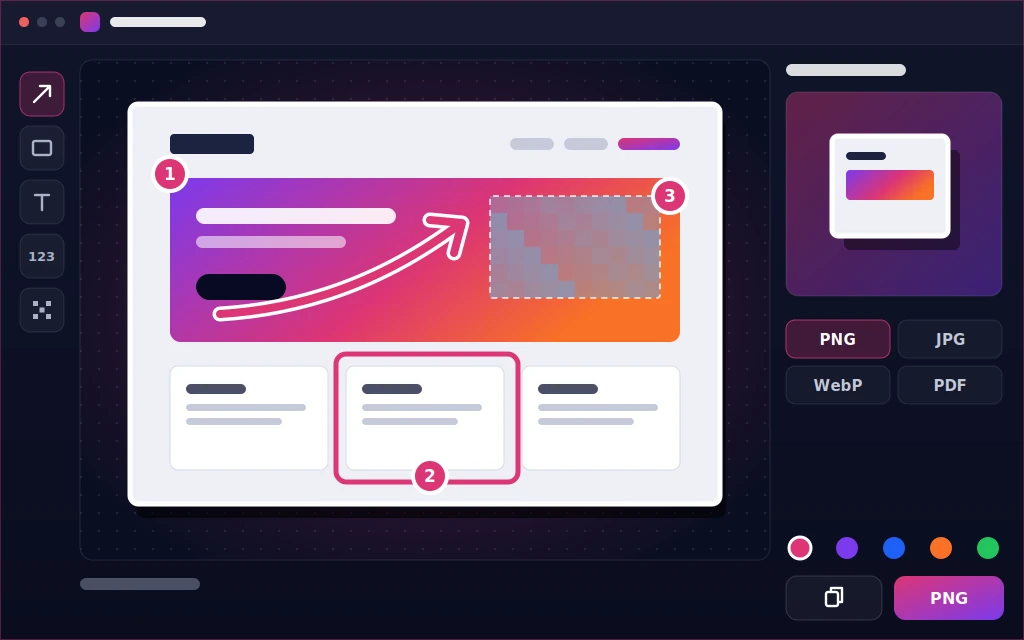

ShotMark combines fast screen capture with a full annotation editor and a format converter in one Windows tool.
The app runs without an installer – just unzip the package and launch the .exe – and without sending screenshots to the cloud: images stay on your disk until you send them somewhere yourself. Choose from ten colour schemes, and each of the six capture modes gets its own, fully customisable keyboard shortcut.
Capture an area, the full screen, the active window, the monitor under your cursor, the last area or a delayed shot – the overlay highlights the detected window for one-click capture.
Arrows, shapes, text, numbered steps, blur and pixelation – all in one window, right after you take the shot.
Save your screenshot as PNG, JPG, WebP, GIF (including animated), BMP, TIFF or PDF – no extra conversion tool needed.
Convert many files at once, or merge them into a single PDF, an animated GIF or a multi-page TIFF.
Pin a screenshot as a small window that stays visible on your desktop, and give each of the six capture modes its own, fully customisable keyboard shortcut.
Run a single .exe file, keep your screenshots on your own disk, and match the look to your taste with ten ready colour schemes (dark and light).
Choose a plan: a one-off licence or a subscription with updates.
One-off payment
Price coming soon
A single payment for the licence, with no recurring charges.
Coming soon Ask about access
Recommended
Billed monthly
Price coming soon
Prepaid monthly access. Before the period ends you receive a payment link – no automatic charges.
Renewal via a payment link before the period ends – no automatic charges; you can cancel at any time.
Coming soon Ask about access
Billed annually
Price coming soon
Prepaid annual access. Before the period ends you receive a payment link – no automatic charges.
Renewal via a payment link before the period ends – no automatic charges; you can cancel at any time.
Coming soon Ask about access
Gross prices include Polish VAT. For businesses and customers from other countries VAT is calculated in the order summary (e.g. reverse charge in the EU, 0% outside the EU).
Prices in EUR, USD and GBP are indicative – converted from PLN at the NBP (National Bank of Poland) rate and rounded up. Billing and invoices are always in PLN.
System requirements: Windows 10 (1903 and later) and 11, 64-bit and 32-bit
 Online payment
 VAT invoice
 Access once paid
 Support on business days
Taking screenshots, editing, saving and converting formats all work fully offline – the app has no feature for sending screenshots to the cloud or sharing them online, so your screenshots stay on your own disk.
ShotMark shows whether a given shortcut is registered or already taken by another program (for example Windows 11's Snipping Tool or another screenshot app). Just assign any other free shortcut – each of the six capture modes has its own, fully customisable shortcut.
Windows 10 (1903 or later) or Windows 11, 64-bit or 32-bit – nothing else to install. Just unzip the package and run the .exe file, with no installer and no administrator rights required.
PNG, JPG, WebP, GIF (including animated), BMP, TIFF and PDF. WebP is always saved losslessly; PDF is a save-only format, also available as batch converter output.
You can buy the application online: as a one-off licence, or as a subscription – monthly or annual. You'll find the price of each plan in the application pricing.
We only use essential storage (e.g. to remember this choice). With your consent we also collect diagnostic data about how the site works (clicks, speed, errors) with a pseudonymous session ID – stored only on our server, with no ads and no third parties. Cookie policy
